Most "AI-accelerated development" setups quietly make a trade you might not want to make: every keystroke, every file, and every prompt leaves your machine and lands in someone else's cloud. That's fine for a weekend project. It's a harder sell when the code is a client's core system, the data is regulated, or the intellectual property is the whole company. The stack we run at The Raven Group is built around a different default — keep the work local, use the cloud deliberately — and we've drawn the whole thing on one page so you can copy it.
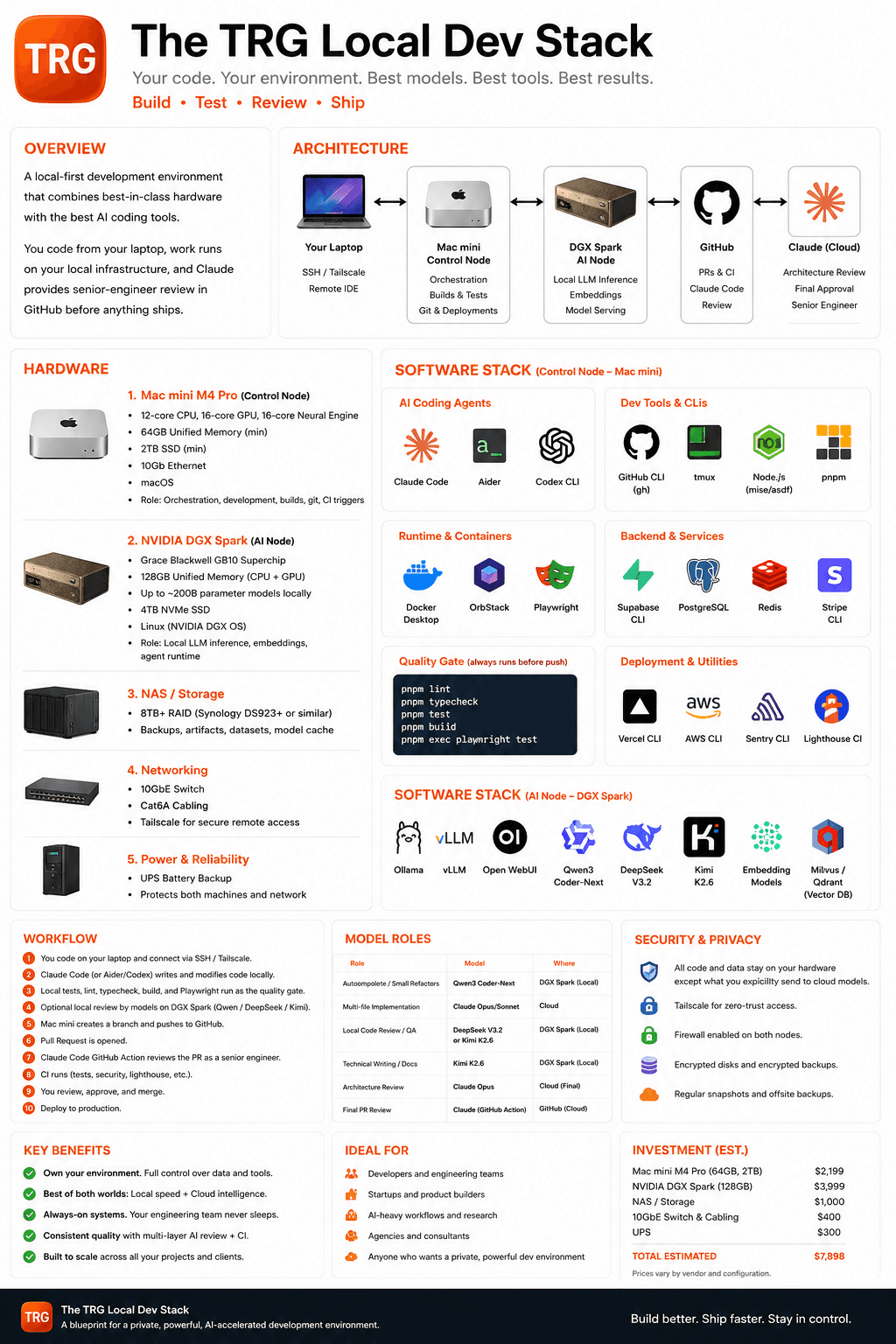
The shape is a local-first environment that combines best-in-class hardware with the best AI coding tools. You code from your laptop and connect over SSH and Tailscale to two machines that do the heavy lifting. A Mac mini M4 Pro is the control node: it orchestrates development, runs builds and tests, owns git, and triggers CI. An NVIDIA DGX Spark sits next to it as the AI node, running local LLM inference, embeddings, and model serving — up to roughly 200-billion-parameter models on 128GB of unified memory, entirely on your own hardware. Behind both, a NAS holds backups, artifacts, datasets, and the model cache, a 10GbE switch links everything, and a UPS keeps the whole thing honest during a power blip.
The software layer is where the "best tools" part earns its place. On the control node: Claude Code, Aider, and the Codex CLI as coding agents; the GitHub CLI, tmux, mise, and pnpm as the day-to-day tooling; Docker and OrbStack for containers, Playwright for browser tests; and CLIs for Supabase, Postgres, Redis, Stripe, Vercel, AWS, Sentry, and Lighthouse so the environment can actually deploy and observe real services. A quality gate — lint, typecheck, test, build, Playwright — always runs before push. On the AI node: Ollama, vLLM, and Open WebUI serve open models like Qwen3 Coder-Next, DeepSeek V3.2, and Kimi K2.6, with an embedding stack and a Milvus/Qdrant vector database for retrieval.
The part that makes it work as a *team* practice rather than a solo rig is the division of labor between models. Fast local models handle autocomplete, small refactors, first-pass code review, and technical writing — cheap, private, always on. The cloud does what it's genuinely better at: multi-file implementation and architecture review go to Claude Opus/Sonnet, and the final pull-request review runs as a Claude Code GitHub Action that reads the PR like a senior engineer before you merge. Local speed for the constant work, cloud intelligence for the decisions that carry risk — you're not choosing between the two, you're routing each task to the layer that fits it.
The workflow reads top to bottom: you write code on your laptop, a coding agent modifies it locally, and the quality gate runs. Optional local review from Qwen, DeepSeek, or Kimi happens on the AI node. The control node opens a branch and a pull request, the Claude GitHub Action reviews it as a senior engineer, CI runs tests and security and Lighthouse, and only then do you review, approve, and merge to production. Every layer of review happens before the merge button, not after the incident.
The security story falls out of the architecture rather than being bolted on: all code and data stay on your hardware except what you explicitly choose to send to a cloud model, Tailscale gives you zero-trust remote access, firewalls are on at both nodes, disks and backups are encrypted, and snapshots run offsite. The estimated hardware investment lands around $7,900 — a Mac mini M4 Pro, a DGX Spark, NAS storage, a 10GbE switch, and a UPS — which is a real number, but a one-time one against a setup that pays off across every project and client that runs through it.
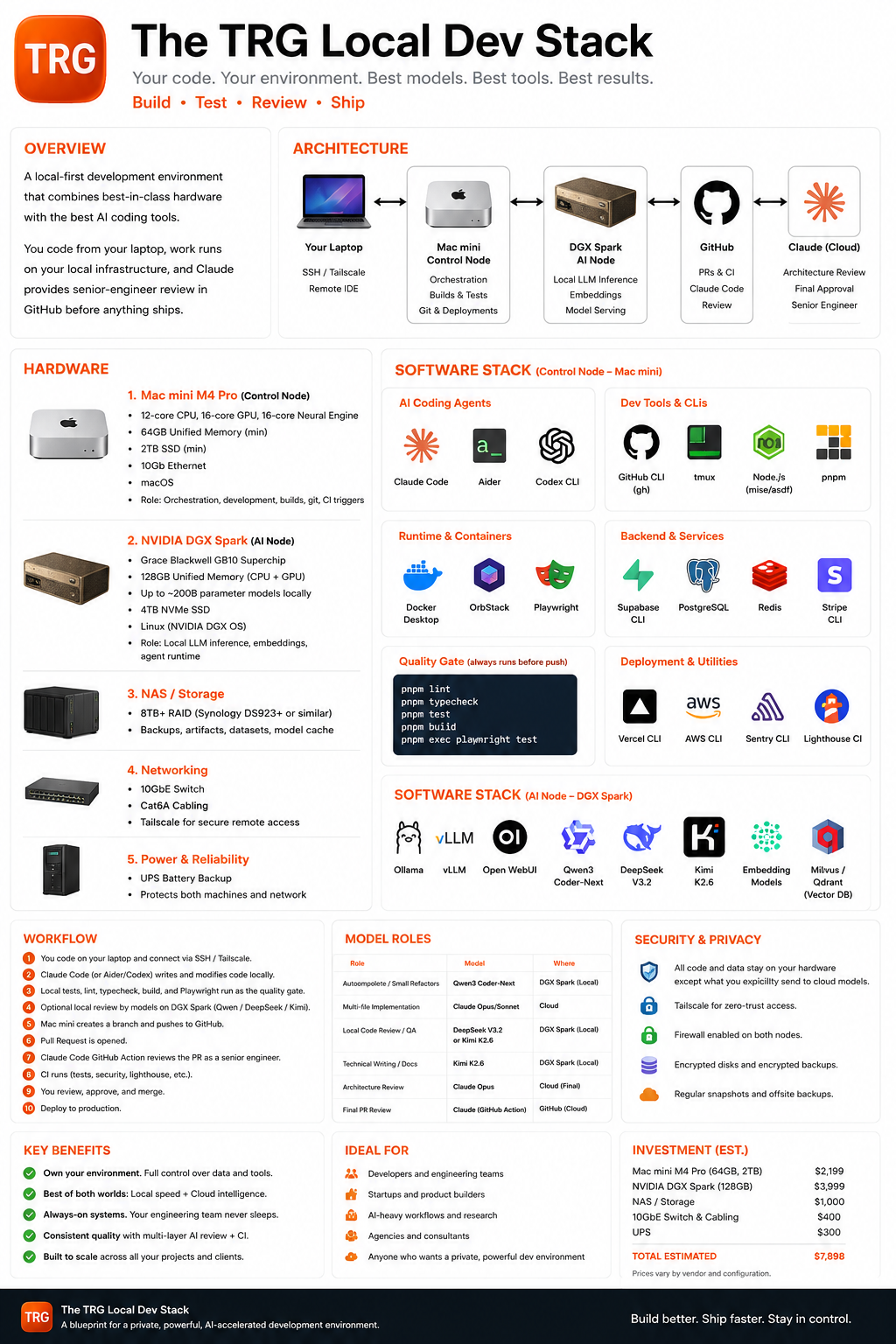
We built this for the people who can't or won't put everything in someone else's cloud but still want the leverage of modern AI coding: engineering teams, product builders, agencies, and anyone who wants a private, powerful, always-on development environment. The one-page blueprint below captures the whole thing — hardware, software, model roles, workflow, security, and cost — in a format you can pin to a wall or hand to a colleague. Download it, and if you want help standing up a version of it, that's the kind of thing we do.